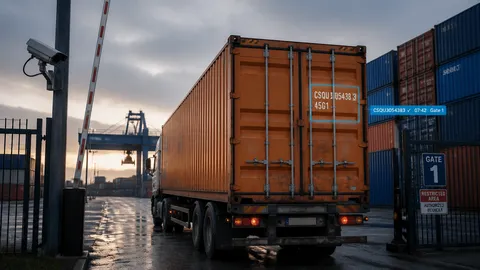
CargoCapture turns gate cameras into an automatic inbound log: every container that enters the yard is photographed, its ID is read, and the result lands in a spreadsheet with date, time and location.
The problem: logging containers by hand
At most container yards, someone still walks up to each truck, reads the container ID off the door and types it into a log. It is slow, it creates a queue at the gate, and a single transposed character means a unit is "lost" in the system. When the gate is busy or the weather is bad, errors climb exactly when accuracy matters most.
Container IDs follow a standard format (ISO 6346): a four-letter owner code, a six-digit serial number and a check digit. That structure makes them ideal for automated recognition.
The customer: a container rental yard
A container rental company approached us wanting to record the ID of every unit entering its yard, without adding staff at the gate. Their requirements:
- Cameras at the entrance gate photograph each container on the back of the truck as it arrives.
- Images upload to CargoCapture automatically, ideally straight from a shared drive.
- Bulk upload is available for batches of images.
- They receive a list of inbound unit IDs, at minimum daily and ideally in real time.
- Output arrives as a spreadsheet with container ID, date, time and location.
The solution: CargoCapture at the gate
CargoCapture fits into the gate workflow the yard already has. Nobody needs to stop the truck or type an ID.
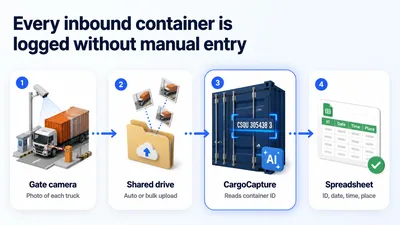
- Capture. A camera at the entrance photographs each container as the truck pulls in. Still images or a video feed both work.
- Upload. Images drop into a shared folder that CargoCapture watches, so processing starts as soon as they arrive. Batches can also be uploaded in bulk.
- Recognize. CargoCapture's AI reads the container ID from each image. For video, it selects only the few frames it needs, which keeps processing efficient and costs down.
- Report. Each read is stored in the customer's cloud account with date, time and location, and delivered as a spreadsheet: daily, on a custom schedule, or in real time.
Beyond container IDs, CargoCapture can also read seal numbers and chassis numbers, so one gate photo can capture more of the record.
What the yard gets
- No manual entry at the gate. Trucks keep moving, and staff are free for other work.
- A reliable inbound record. Every unit is logged with a timestamp and location.
- Data where they already work. Results arrive as a spreadsheet, with no new system to learn.
- Their choice of timing. A daily summary or real-time updates, set to match how the yard operates.
- Room to grow. More gates, more locations or more cameras can be added to the same account.
- Cloud or on-premises. OCR Solutions deploys either way, to fit the customer's IT and data requirements.
Getting started
Every gate is different. Camera angle, lighting, distance and truck speed all affect recognition, so we tune CargoCapture to each site before a trial.
- Send sample images or video from your gate, ideally covering day, night and different weather.
- We analyze and adjust the system to your camera setup and conditions, and advise on camera placement if needed.
- Start your trial, so you see the accuracy you would get in production.
- Go live with automatic uploads and the reporting schedule you choose.
To prepare a pricing estimate, we ask for approximate daily or monthly container volume, the number of gates or cameras, and whether you need real-time results or a daily report.
Frequently asked questions
Can CargoCapture upload images automatically from a shared drive?
Yes. CargoCapture can watch a shared folder and process each image as it arrives, with no manual step. We configure it around your camera setup.
Can I upload images in bulk?
Yes. You can upload a batch of images at once, from a handful to a full day's captures.
What output do I get?
Each read is stored in your cloud account with the container ID, date, time and location. You can receive it as a spreadsheet daily, on a schedule you choose, or in real time.
How accurate is the recognition?
CargoCapture is used at sites around the world and reads accurately in typical gate conditions. Accuracy depends mainly on camera placement, lighting and image quality. Send us sample images and we will give you a realistic estimate for your gate.
Do I need special cameras?
Usually not. Many existing gate or security cameras produce usable images. We review your samples and advise if a camera needs repositioning or upgrading.
Can it work with video instead of still photos?
Yes. CargoCapture extracts the few frames it needs from the video to read each ID. Processing only those frames keeps costs down.
Can it read more than the container number?
Yes. CargoCapture also reads seal numbers and chassis numbers.
Is there a mobile option?
Yes. The CargoCapture app lets staff capture container IDs from a phone, which is useful for yard checks or sites without fixed cameras.
Can it run on our own servers?
Yes. OCR Solutions supports both cloud and on-premises deployment.
How is CargoCapture priced?
Pricing is based on the number of images processed, plus the number of locations or cameras. Tell us your approximate volume and setup, and we will send an estimate.
How do I start a trial?
Send us sample images or video from your gate. We tune the system to your conditions, then set up your trial. You can also request a trial at cargocapture.ai.